 Behat
Behat
Output Formatters
Behat supports different ways of printing output information. Output printers
in Behat are called formats or formatters. You can tell Behat to
run with a specific formatter by providing the --format option:
$ behat --format progress
Note
The default formatter is pretty.
Behat supports 3 formatters out of the box:
pretty- prints the feature as is, with the full text of each step.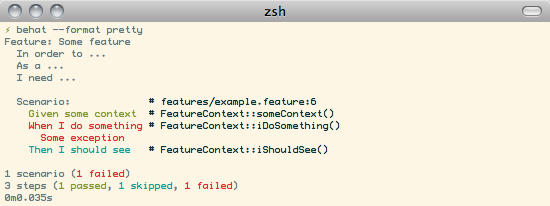
progress- prints one character per step: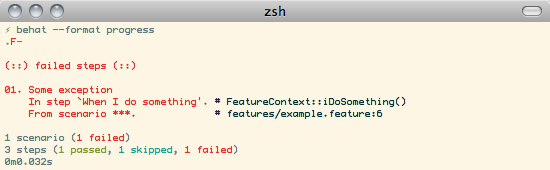
junit- prints the output to xml files in the standard junit.xml formatjson- prints the output to a json file in json format.You can see the schema of this json file in the Schema definition in GitHub
If you don’t want to print output to the console, you can tell Behat
to print output to a file instead of STDOUT with the --out option:
$ behat --format pretty --out report.txt
Note
Some formatters, like junit or json, always require the --out option to be
specified. The junit formatter generates *.xml files for every
suite, so it needs a destination directory to put these XML files into. The json formatter
outputs a single file, so it needs the path of this file (which will be created if it does
not exist)
Also, you can specify multiple formats to be used by Behat using multiple –format options:
$ behat --format pretty --format progress
In this case, default output will be used as output for both formatters. But if you want
them to use different ones - specify them with --out:
$ behat -f pretty -o ~/pretty.out -f progress -o std
  -f junit -o xml
In this case, output of pretty formatter will be written to ~/pretty.out file, output of junit
formatter will be written to xml folder and progress formatter will just print to console.
Behat tries hard to identify if your terminal supports colors or not, but
sometimes it still fails. In such cases, you can force Behat to
use colors (or not) with the options --colors or --no-colors,
respectively:
$ behat --no-colors
Format Options
The formatters can be configured with some options. The following options are available for all formatters:
output_verbosityindicates the level of detail of the output. Use one of theOutputFactory::*constantsoutput_pathindicates the path where the output should be saved. Equivalent to the--outcommand line option. Should be a file or folder, depending on the formatter.output_decoratedetermines whether the output generated by Behat is “decorated” with formatting, such as colors, bold text, or other visual enhancements. Should be a boolean, defaults to true.output_stylescan be used to override the default styles used by Behat to display the different output elements. It should be an array where the key is the style that needs to be overridden and which points to an array of three values. The first one is the foreground color, the second one the background color and the third one an array of optional styles.
The styles available for redefinition are:
keywordstyle of Gherkin keywordsstdoutstyle of stdout outputexceptionstyle of exceptionsundefinedstyle of undefined stepspendingstyle of pending stepspending_paramstyle of pending step paramsfailedstyle of failed stepsfailed_paramstyle of failed step paramspassedstyle of passed stepspassed_paramstyle of passed steo paramsskippedstyle of skipped stepsskipped_paramstyle of skipped step paramscommentstyle of commentstagstyle of scenario/feature tags
Available colors for first two arguments (fg and bg) are: black, red, green, yellow,
blue, magenta, cyan and white.
Available optional styles are: bold, underscore, blink, reverse and conceal
Pretty formatter
The following options are specific to the Pretty formatter:
timershow time and memory usage at the end of the test run. Boolean, defaults to true.expandprint each example of a scenario outline separately. Boolean, defaults to false.pathsdisplay the file path and line number for each scenario and the context file and method for each step. Boolean, defaults to true.multilineprint out PyStrings and TableNodes in full. Boolean, defaults to true.showOutputshow the test stdout output as part of the formatter output. Should be one of theShowOutputOptionenum values, defaults toShowOutputOption::Yes.shortSummaryshow just a list of failing scenarios at the end of the output. If false, a full summary (which also includes a list of failing steps) will be printed. Defaults to trueprintSkippedStepsIf the output should include any steps which are skipped by the runner. Useful when you don’t want to see all the skipped steps after a failed step. Defaults to true
Progress formatter
The following options are specific to the Progress formatter:
timershow time and memory usage at the end of the test run. Boolean, defaults to true.showOutputshow the test stdout output as part of the formatter output. Should be one of theShowOutputOptionenum values, defaults toShowOutputOption::InSummary.shortSummaryshow just a list of failing scenarios at the end of the output. If false, a full summary (which also includes a list of failing steps) will be printed. Defaults to false
JUnit formatter
The following options are specific to the JUnit formatter:
timershow time spent in each scenario and feature. Boolean, defaults to true.
JSON formatter
The following options are specific to the JSON formatter:
timershow time spent in each scenario, feature and suite. Boolean, defaults to true.
Setting format options
Format options can be set using the withFormatter() function of the Profile PHP config class. For example:
use Behat\Config\Config;
use Behat\Config\Profile;
use Behat\Config\Formatter\PrettyFormatter;

$profile = (new Profile('default'))
    ->withFormatter((new PrettyFormatter(paths: false))
        ->withOutputStyles([
            'comment' => [
                'black', 'white',
                ['underscore', 'bold']
            ]
        ])
    )
;

return (new Config())->withProfile($profile);
- These options can also be set on the command line by using the
--format-settingoption which accepts a json object with this configuration. For example:
$ behat --format-settings='{\"paths\": false}'
Disabling a formatter
You can disable a formatter so that it won’t be available by using the disableFormatter() function of the
Profile PHP config class. For example:
use Behat\Config\Config;
use Behat\Config\Profile;
use Behat\Config\Formatter\PrettyFormatter;

$profile = (new Profile('default'))
    ->disableFormatter(PrettyFormatter::NAME)
;

return (new Config())->withProfile($profile);